How to Promote Your Nonprofit Online and Reach More Supporters
Discover how to promote your nonprofit online and reach more supporters with 6 impactful and easy-to-apply digital marketing strategies.
You’ve put care, time, and energy into building something that matters. Now it’s time to help more people see it and get involved.
Online spaces can feel noisy, and if your presence isn’t clear or consistent, even the most passionate mission can get overlooked. But showing up online doesn’t have to feel overwhelming.
With a few focused steps and the right tools, you can start building awareness in a way that feels true to your work. And over time, that steady visibility can lead to deeper support, stronger connections, and a bigger impact, without pulling you away from the mission itself.
How Online Promotion Helps Your Nonprofit Grow and Stay Visible
You’re already doing meaningful work—online promotion just helps more people see it.
When your nonprofit shows up consistently online, it becomes easier for people to recognize your name, understand your mission, and take that next step—whether that’s donating, signing up to volunteer, or sharing your work with others.
You don’t have to be everywhere. But having a clear, well-branded presence in a few key places—your website, social media, and email—makes your nonprofit feel active, trustworthy, and easy to support.
It’s not about marketing for marketing’s sake. It’s about helping your mission reach the people who care.
4 Statistics That Prove Online Marketing Matters for Nonprofits
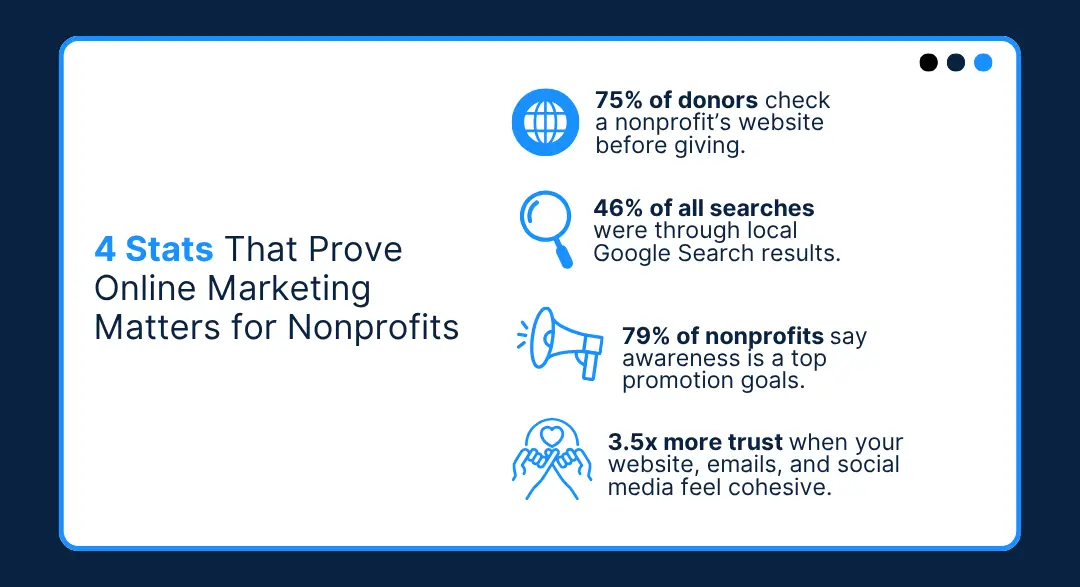
These numbers make it clear that promoting your nonprofit online is one of the best ways to help people find, trust, and support your nonprofit:
1. Most Donors Check Your Website Before Giving
Roughly 75% of people check a nonprofit’s website before donating. That makes your website one of the most important tools you have to build credibility and connection. (Donor Direct)
2. Consistency Builds Trust With Your Supporters
When your website, emails, and social media all look and feel like the same brand, people are 3.5x more likely to trust your organization. Consistent design helps your mission feel organized and reliable. (The Breezy Company)
3. Awareness Is A Top Priority
79% of nonprofits say fundraising is their top content goal, but brand awareness and engagement are close behind. That means promotion isn’t only for asking for support, it’s also about getting your nonprofit seen and remembered. (GoFundMePro)
4. Search is a Key Way People Find You
Many supporters (46%) discover nonprofits through Google and local searches, especially on mobile. Keeping your information updated and showing up in search results can be the first step toward a new connection. (Synup)
6 Online Marketing Actions Every New Nonprofit Should Try
1. Brand With Purpose and Personality
Your mission deserves to be seen and remembered.
When your nonprofit’s brand is clear and consistent, it’s easier for people to recognize your work, trust it, and take action. That doesn’t mean your brand has to be flashy or complicated. But it does need to be clear, consistent, and easy to recognize—wherever someone sees your name.
What slows most teams down isn’t the design—it’s the scramble.
Logos are scattered across old email threads. Colors that “seem close enough.” A last-minute flyer made with whatever font was already open.
That’s where a brand kit changes everything.
It’s your visual home base—your logo files, color codes, fonts, and templates, all in one organized spot. It keeps your materials consistent. It keeps your team aligned. And it makes everything from social posts to donation receipts feel like they came from the same trusted source.
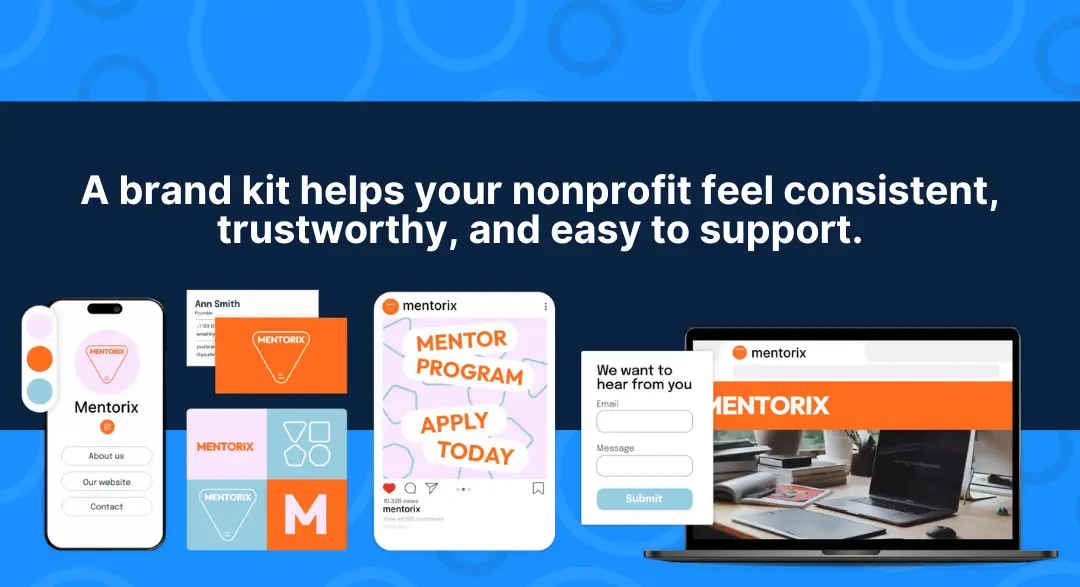
Check out our step-by-step blog on how to create a brand kit for your nonprofit—it’s packed with tips to keep everything consistent, clear, and easy to use.
Know Who You’re Trying to Reach
You’re not talking to “the public.”
You’re talking to real people—with real values, questions, and reasons for caring. The clearer you are about who you're trying to reach (your target audience), the easier it is to say the right thing, in the right way, at the right time.
Start small by picturing one person:
- Name: Sarah
- Age: 34
- Role: Parent and community volunteer
- What matters to her: Helping kids learn to read
- Where she hangs out: Instagram and Facebook, mostly on her phone
- What catches her eye: Local photos, simple messages, and clear ways to help
If you’re running a literacy program, Sarah doesn’t need a mission statement; she needs to see a kid holding their first book, and a button that says “Volunteer with Us.”
When you create content with her in mind, it lands. Because it’s not about broadcasting a message. It’s about showing up in someone’s feed and making them say, “This feels like something I can do.”
Not sure who you’re trying to reach? Our five-step guide makes it easy to define your target audience and connect with the people who care most.
2. Build a Website That Supports Your Mission
If someone hears about your nonprofit and wants to learn more, the first place they’ll go is your website. And if they’re ready to donate or sign up to help, your website needs to meet the moment.
You don’t need something super flashy; you need a functional website, one that makes it easy for people to understand what you do and why it matters, and then take the next step.
Here’s what’s important to have on your nonprofit website:
A Clear Homepage That Shows What You Stand For
Within five seconds, visitors should understand who you help, how, and how they can get involved. That’s where your logo, tagline, and first headline do the heavy lifting.
If your logo or brand colors feel off, LOGO.com’s tools can help you create a clean, updated look that works across your website and social channels.
An About Page With Personality
This isn’t the place for corporate buzzwords or copy-pasted mission statements. People want to know who’s behind the work and why it matters to you.
What inspired you to start? What keeps you going? Share that story in your own words, and don’t be afraid to show your face. Real photos, real names, and a little heart go a long way in building trust.
A Get Involved Page That Meets People Where They Are
Not everyone’s ready to donate on their first visit, and that’s okay.
Some people might want to share your story on social media. Others might be looking for volunteer opportunities or just want to stay in the loop. Give people a few clear ways to support you, from quick wins to deeper commitments.
Use simple buttons, not long paragraphs, because action should feel easy, not overwhelming.
A Donation Page That Works
If someone clicks “Donate,” they’ve already made a decision—they just need your page to make it easy to follow through.
So don’t overcomplicate it. Ditch the long forms and give people what they’re looking for: a few clear options, language that makes the impact feel real, and the choice to give once or monthly.
Instead of saying, “Choose your donation amount,” say:
- “$25 feeds one student for a week.”
- “$100 covers classroom supplies for 10 kids.”
Show them what their gift does, not just what it costs.
After they give, close the loop with a simple thank-you email that looks like it came from your team, not a generic payment processor. With LOGO.com’s Email Signature tool, your confirmation messages can carry your logo, brand colors, and a quick note of gratitude that feels like you put thought into it.
A Website That Works on All Devices
Scroll through your analytics, and you’ll probably see it: most of your visitors are on mobile. That’s especially true if they’re clicking from social media, email, or text.
But if your website’s slow to load, buttons are hard to tap, or the donation form breaks on a phone? That support disappears.
Your website should feel just as smooth on a smartphone as it does on a laptop—no zooming, no guessing, no frustration.
That’s why LOGO.com x Wix website builder uses mobile-responsive templates from the start. No extra settings, no tech tweaks—just a site that looks clean and works everywhere, automatically.
Because when someone wants to help, your website shouldn’t be the reason they don’t.
3. Become Easy to Find Online (Without Paying for Ads)
People are searching online for ways to help, give, or get involved, and you want your nonprofit to be one of the first names they see.
You don’t need a big ad budget to make that happen. With a few simple SEO (search engine optimization) practices, you can help your website show up when people search for causes like yours.
Start by using language your audience types into Google.
Instead of generic phrases like “volunteer opportunities,” think local and specific keywords like:
- “Free tutoring in Orlando”
- “Homeless shelter near me”
- “After-school programs for teens in Austin”
Use these phrases naturally in your website’s page titles, headlines, and descriptions.
If you have a page about your services, name it something clear like “After-School Programs in Denver” rather than something vague like “What We Do.”
Your meta description—the little summary that shows up in search results—also matters.
Keep it simple and to the point, like:
“Helping teens learn to code—for free. Join our weekly classes or volunteer with us.”
Beyond keywords, think about the content you’re sharing.
Google wants to show helpful information, so keep your website active with:
- Recaps from community events.
- Stories from people you’ve helped.
- Volunteer spotlights or how-to guides.
- Answers to common questions (like “how to donate school supplies”).
The more useful and relevant your content is, the more likely it is to get seen.
Make it Easy for Locals to Find You
If you want local support, you’ve got to be easy to find. Not just on social media, but in the places people search when they’re looking for something real and nearby—like Google Maps.
Claiming your Google Business Profile takes about ten minutes to complete, and it’s free. Just add your contact info, photos that show your work in action, and a short description of what you do. You can even post updates or events—kind of like a mini social feed, but built for local search.
Even if SEO sounds intimidating, these small steps can go a long way in helping your nonprofit get found by the people looking for exactly what you offer.
Because when someone Googles “nonprofits near me” or “volunteer opportunities in [your town],” showing up with a friendly, up-to-date profile helps them trust you faster.
It says, “We’re here. We’re active. And yes, we’d love your help.”
4. Share Your Nonprofit On Social Media
You don’t need to master every platform or post five times a day. What matters is showing up in a way that feels real.
Social media is where people go to see what you’re about. So show them. Snap a quick photo of volunteers in action. Share a behind-the-scenes win. Thank a donor in your stories. Let people feel the heartbeat of your work, not just the polished version.
The goal isn’t to impress. It’s to connect. Because once someone sees the impact you’re making, they’re way more likely to want to be part of it.
Simple, Repeatable Content Ideas for Your Nonprofit’s Social Media
Not sure what to post on your social profiles?
These low-lift ideas can help you connect without overthinking:
Behind-the-Scenes Moments
Let people see the real work: a volunteer setting up chairs, someone sorting donations, or the quiet five minutes before an event starts.
These moments build trust and remind people that your nonprofit is made of real, caring humans.
Impact Snapshots
A short quote from someone who benefited or a quick before-and-after story can speak louder than stats. These are easy to capture and powerful to share.
Milestone Updates
Celebrate progress, big or small. “We delivered our 1,000th care package this week!” helps people feel like they’re part of something that’s growing and making a difference.
Resource Posts
Share practical, mission-aligned tips or information your audience will appreciate, like “3 Easy Ways to Volunteer with Kids” or “How to Host a Mini-Fundraiser in Your Neighborhood.”
These posts help build trust and keep your content helpful, not just promotional.
You’re Busy Doing the Work—Let Your Content Keep Up
Running a nonprofit means your focus is on the mission, not stuck behind a screen trying to design the perfect Instagram post. That’s why having a few ready-to-go content templates can save your sanity (and your time).
Build 2–3 simple post formats you can plug content into when you’ve only got a few minutes:
- A quote graphic for quick wins or testimonials
- A photo post for highlighting an impact stat
- A thank-you layout with your logo, colors, and a short caption
When your posts follow a familiar format and stay on-brand, you stay visible, even when your hands are full. And showing up consistently (even just once a week) keeps supporters connected without pulling you away from the work that matters most.
To make it even easier, LOGO.com gives you a built-in brand kit and ready-to-use social media templates—so your logo, colors, and fonts are always at your fingertips.
5. Use Email and Texts to Build a Real Connection
Social media is great for getting noticed. But when it comes to building trust and keeping people engaged, nothing beats a direct message in someone’s inbox—or on their phone.
Here’s why.
Email Gives You a Clear Lane to Your Supporters
Whether it’s a monthly update, a donor thank-you, or a volunteer spotlight, email gives your nonprofit a chance to speak directly to people who already care.
It doesn’t need to be overdesigned. A clear subject line, a warm note, and a button in your brand colors can still feel personal and put-together.
You can promote your nonprofit through email by:
- Highlighting volunteer stories or staff spotlights.
- Sharing quick event recaps or upcoming opportunities.
- Offering behind-the-scenes updates that donors won’t see on social.
- Reminding people how their support is making a difference.
Your brand kit comes in handy here, too! Create branded email templates using your logo, colors, and fonts to make every message feel consistent and trustworthy.
Texts Are Great for Short, Timely Reminders
Apps like WhatsApp or simple SMS tools work well for:
- Confirming volunteer shifts or sharing last-minute changes.
- Sending a donation prompt on a giving day.
- Reminding people about an event they RSVP’d to.
Text messages are handy because they’re short, direct, and land right in someone’s pocket as soon as you press ‘send.’ Just make sure they’re useful, respectful, and always come with an opt-out.
6. Keep it Simple and Consistent
You don’t have to be everywhere or post every day. What matters most is showing up consistently, in a way that feels clear and familiar to the people you’re trying to reach.
That could mean sending one branded newsletter a month. Updating your website photos once a season. Or sharing donation reminders with the same look and feel each time you run a campaign.
When your logo, colors, and fonts stay consistent—from your website to your social posts to your receipts—people start to recognize you faster. And that recognition builds trust.
LOGO.com makes this part easy. Your brand colors, fonts, and logo are saved in your dashboard, ready to apply across your website, email templates, Link in Bio, and even merch—so you don’t have to start from scratch every time.
The goal isn’t perfection. It’s clarity. A few thoughtful, consistent choices go a long way in helping supporters feel confident clicking “donate,” “volunteer,” or “share.”
A Three-Week Kickstart Plan to Promote Your Nonprofit Online
You’ve got a mission that matters—and it’s time to help more people see it, support it, and share it. This simple, three-week plan will help you build visibility, grow trust, and create momentum online—without needing a marketing degree to make it happen.
Ready to get your message out there?
Let’s get started!
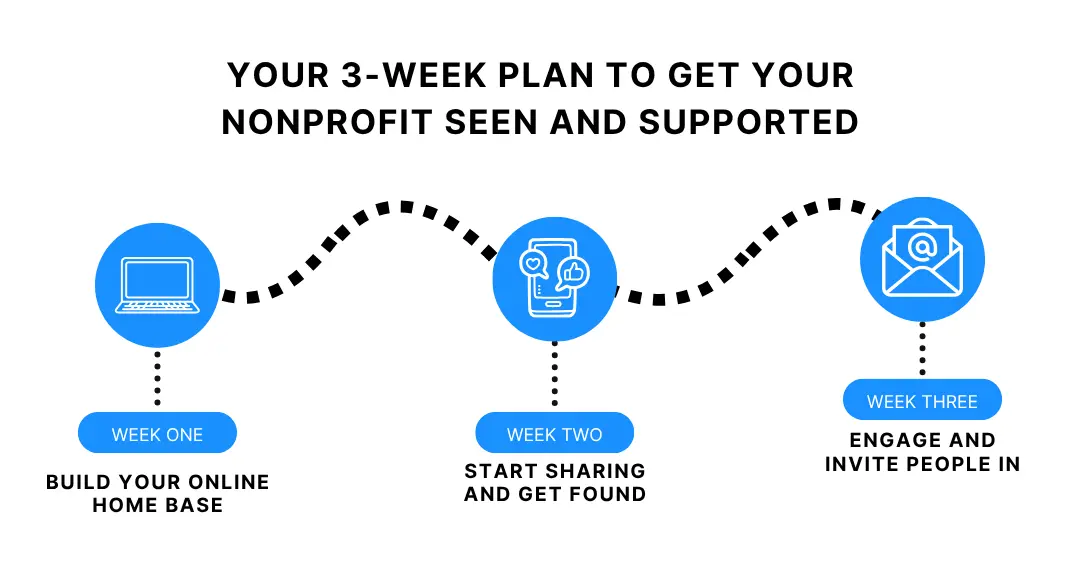
Week 1: Build Your Online Home Base
Start with your brand and website; these are the anchors for everything else you’ll share online.
Begin by:
- Choosing your logo, color palette, and fonts—they’ll shape how people recognize and remember you.
- Applying your brand kit to your website. Update headers, footers, buttons, and page titles so everything feels unified.
- Adding your logo to your favicon (that tiny icon in browser tabs) can help build recognition instantly.
- Writing a short About page that’s clear, friendly, and focused on your mission.
If you’re using LOGO.com x Wix, most of this can be done in a few clicks. It doesn’t have to take all week, but getting this step right helps everything else fall into place.
Week 2: Start Sharing and Get Found
Now that your website and branding are in place, it’s time to start telling your story and helping people find you.
Start with:
- Posting a simple story or update to your website or blog. It could be a volunteer spotlight, a recent win, or why your nonprofit exists in the first place.
- Claiming or updating your Google Business Profile so you show up in local searches and on Google Maps. Add your hours, location (if applicable), and photos.
- Creating two reusable social media templates using your brand kit, like a quote graphic and an impact stat.
- Sharing a few posts that reflect your mission: a behind-the-scenes photo, a donor thank-you, or a quick “how you can help” reminder.
Remember, there’s no pressure to post every day. Just start showing up in a way that feels aligned with the work you’re doing.
Week 3: Engage and Invite People In
This is where you start turning attention into action.
Finish week three strong by:
- Sending your first branded email—a warm update, a story of impact, or a thank-you note. Use your logo, brand colors, and a clear call to action.
- Setting up your Link in Bio page so your social followers can easily access your website, donation page, and volunteer sign-up in one place.
- Reaching out to one or two local partners or like-minded organizations to explore a simple collaboration or cross-promotion.
- Asking a few supporters to share your Link in Bio or a favorite post—give them a clear link and a short description to make it easy.
By the end of these three weeks, you’ll have a professional website, consistent branding, live content, visibility in search, and the start of a strong email and social presence.
That’s more than progress.
It’s a real foundation you can keep building on.
Let More People See—and Support—Your Mission
Everything you’re doing—building programs, rallying volunteers, showing up for your community—deserves to be seen.
When your website, emails, and social posts reflect the clarity and care behind your mission, people notice. And when it’s easy for them to see how they can help, they act.
Want tools to make this easier? LOGO.com offers everything you need in one place—logo, brand kit, website builder, social templates, email signature, and more.
Set it up once, and keep your focus where it belongs: on your mission.
Recent posts
Oct 19, 2026 by: Sean Baker
Oct 14, 2026 by: Vanessa Lam
Oct 12, 2026 by: Sean Baker
Oct 5, 2026 by: Sean Baker